
Every user on Steam has a Steam ID. It's a unique 17-digit string that is used to identify your account. Third-party tools can sometimes require it to link to your account.
We're going to explain everything you need to know about your Steam ID, including how to find out what it is.
What Is a Steam ID?
Every account on Steam has a unique Steam ID. You will never have the same Steam ID as someone else. It's a 17-digit number that is tied to your account and you can't change it.
Your Steam ID is not your username, which you used to sign in to Steam with, nor your display name, which is what you appear as to other players.
Your Steam ID may appear in your profile's URL. By default, Steam profile URLs format like so, with your Steam ID appended: https://ift.tt/3wmQScc
If you've set a custom URL in your Steam account settings, this will replace the Steam ID in the profile URL.
Why Do You Need Your Steam ID?
You may never need to know what your Steam ID is. It's not private information either, so don't worry if someone says they know your Steam ID—you can just as easily find out theirs, using tools like Steam ID Finder.
However, some third-party services or developers/publishers (like Ubisoft and EA) can ask for your Steam ID. They might need this to link something to your account or to look you up in their database to provide support.
How to Find Your Steam ID
It's simple to find out what your Steam ID is. Here's how:
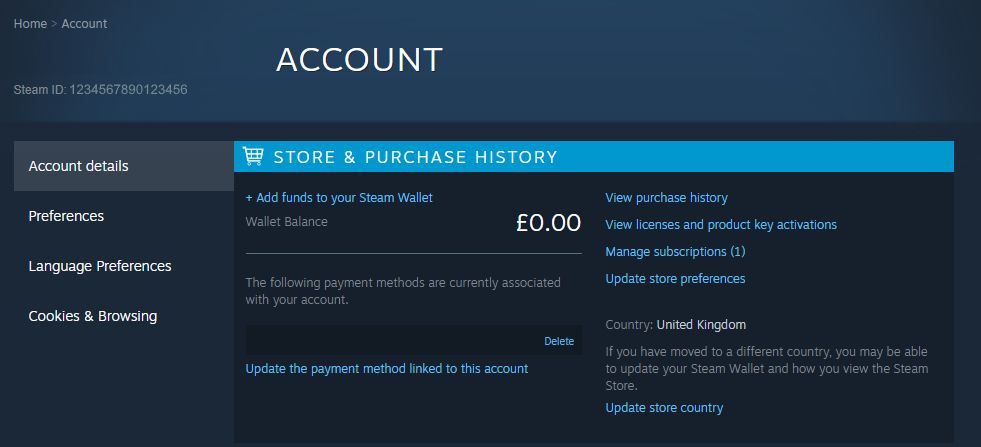
- Open the Steam client.
- Click your profile picture in the upper-right.
- Click Account details.
- It lists your Steam ID at the top of the page, beneath the title.
Find Out More About Your Steam Account
You might not have known that your Steam account has a unique ID. Should you ever get asked for it, you now have the knowledge to retrieve it.
Did you know that you can also view your entire Steam purchase history from your account? It's worth poking around in your account settings to see if there's anything you want to customize.





0 Comments